
Verification Checklist
- ✓Open the transaction detail in your banking app and check whether it's labeled "Pending" or "Posted" — the two mean very different things
- ✓Compare the pending hold amount against the later posted charge — are they identical, and if not, how large is the difference and in which direction
- ✓Count how many entries show up for this one subscription action — one hold that converts to one posted charge is normal; two separate entries that both post is a real double charge
- ✓If you've already cancelled the subscription or trial, check whether this hold has been outstanding longer than your card issuer's stated release window
- ✓If a hold won't release, have you contacted your card issuer directly, rather than the AI platform or merchant first
1. The symptom: a "pending hold" shows up first, then a separate "posted" charge
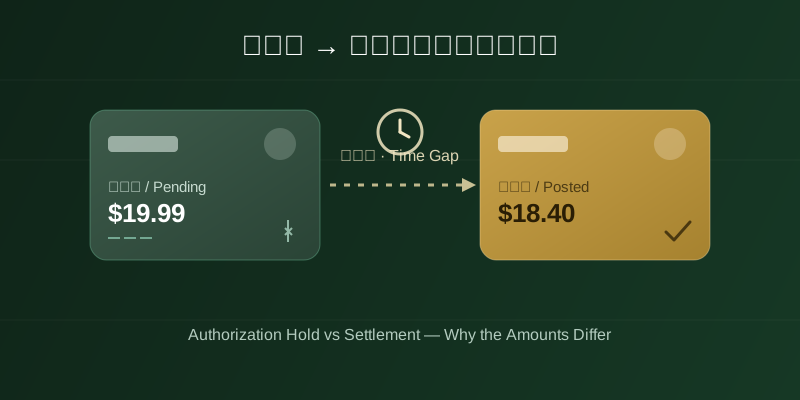
At the moment you start an AI subscription, renew, or convert a free trial to paid, opening your bank's app often shows a transaction marked "pending" or "authorization hold" first. Its amount sometimes matches the subscription price exactly, sometimes it's a small, obviously symbolic amount (often around $1) used purely to verify the card, and sometimes it's slightly higher than the eventual charge. A while later — it could be minutes, or a day or two — a second entry appears marked "posted," and this is the one that actually moves the money; its amount may match the earlier pending hold exactly, or may not. The first time people notice this, it's easy to panic: was I charged twice? Did the platform quietly test the card with a small charge and then sneak in a bigger one later? That worry is understandable, but this is the standard two-stage flow that virtually every card transaction goes through — it isn't something specific to AI platforms, and by itself it isn't evidence of being overcharged.
2. The mechanism: authorization and settlement/capture are two separate stages
A card transaction generally moves through payment networks in two steps. Step one is "authorization": the merchant's payment gateway asks the card issuer to confirm the card is valid and has sufficient available funds; once approved, the issuer temporarily earmarks that amount out of your available balance — this is exactly the "pending" or "hold" entry you see in your banking app. It's a temporary freeze; the money hasn't actually left your account, it's just unavailable for other spending in the meantime. Step two is "settlement" or "capture": the merchant (here, the AI platform or its payment processor) later submits the transaction to the issuer to actually pull the funds, at which point the issuer transfers the money for real and the entry's status flips from "pending" to "posted." Visa's official merchant-facing document, "Authorization and Reversal Processing Best Practices," explicitly distinguishes these two stages and warns merchants that an authorization should be settled promptly — leaving it unsettled for too long ties up a cardholder's funds unnecessarily and generates complaints. Visa Acceptance Support's explainer on "Authorization Reversal" likewise confirms that refunds are only possible once a transaction has actually settled; before settlement, the only available action is reversing (voiding) the authorization to release the hold.
3. Why the two amounts don't always match: small verification holds, and a buffer for tax/FX movement
A mismatch between the pending hold and the final settled amount is common and, on its own, doesn't indicate an error. One common case is a "verification authorization": some AI platforms or their payment processors only run a token, small-value hold (often around $1) when a new card is added or a free trial starts, purely to confirm the card is live — this small hold isn't the real subscription fee itself; the actual subscription charge is applied separately at settlement, or the small hold is simply voided once verification succeeds and never becomes a real charge. Another common case is a built-in "buffer for floating costs": for cross-border transactions, FX conversion and estimated taxes can shift the final payable amount somewhat, so to avoid the final settlement exceeding the originally authorized amount (which can cause the transaction to fail), a merchant may intentionally authorize a slightly higher amount than expected up front, then settle for the actual amount owed — meaning the final settled charge is usually equal to or lower than the pending hold. In either case, as long as the amount that finally posts matches the subscription price shown on the AI platform's own billing page, this isn't anomalous; it's only worth escalating under the next section's path if the settled amount is noticeably higher than the price the platform itself advertises.
4. How to tell "pending" from "posted" in your banking app, without mistaking two entries for two charges
Virtually every bank and card issuer's app clearly distinguishes "pending" from "posted" transactions — usually with different labels, colors, icons, or separate grouped sections. Chase's official page on "Pending Transactions" explains that a pending status means the amount has been "committed" by the merchant and is moving between accounts, but hasn't actually been deducted from your account balance yet — only from your available balance. This is also why some banking apps display separate "account balance" and "available balance" figures: a pending transaction reduces the available balance without touching the account balance until it actually settles. The concrete way to verify this: open the transaction's detail view and check exactly what the status field says. If a single subscription action corresponds to one entry that transitions from "pending" to "posted" (possibly with a small amount adjustment), that's the normal authorization-to-settlement flow, not a double charge. Only when your statement shows two genuinely separate entries that each independently reach a "posted" state should you treat it as an actual duplicate charge and escalate to your card issuer or the platform's support.
5. How long does a hold take to release automatically — no single number, it depends on your issuer
If a merchant never submits an authorization for settlement (say, a free trial that was never converted to paid, or a transaction cancelled before settlement), the hold doesn't stay in place forever. Card issuers automatically release these unreleased holds after some period, returning the funds to your available balance, and the corresponding "pending" entry typically disappears from your banking app at the same time. It's worth being honest here: the exact number of days for this automatic release varies by card issuer, by card network (Visa, Mastercard, and others), and by transaction type (hotel-style pre-authorizations, for instance, often follow longer release rules than ordinary purchases). Public sources commonly describe this as "anywhere from a few days up to around 30 days," but there is no single, uniform figure — the actual timeline is whatever your specific card issuer's policy states, and this piece does not assert a fixed number. If a hold has clearly outlived any reasonable waiting period and still hasn't disappeared, the most direct step is to contact your card issuer's support directly, flag it as an unreleased hold, and ask them to investigate — rather than waiting passively.
6. After cancelling a subscription or trial, who handles a hold that's still sitting there
Many people who cancel an AI subscription — or cancel during a free trial before it converts — notice that the earlier pending hold hasn't disappeared right away, and assume the cancellation "didn't really work." In reality, cancelling a subscription typically just stops future renewal on the platform's side; it neither can nor does directly "undo" a hold that already exists in your card issuer's own system. Releasing a hold is either an automatic mechanism on the issuer's side, or something that requires manual issuer intervention — the most a merchant can do is proactively submit an "authorization reversal" request for an unsettled hold, but whether and when it actually releases remains entirely up to the issuer, not something the merchant or the user directly controls. So if a hold is still showing after you've cancelled, the first step isn't to keep asking the AI platform's support "are you sure it's really cancelled" (you can first confirm in your account settings that the subscription status genuinely shows cancelled or expired); the second, more direct step is to contact your card issuer, describe the situation, and provide the hold's transaction details so they can check its status and determine whether manual release is needed — this is a more effective path than going through the merchant.
7. Takeaway
A "pending hold" and a later "posted charge" showing up together on a card statement is simply the standard authorization-and-settlement flow that nearly every card transaction goes through, with an unpredictable gap in between, and the amounts may differ slightly due to small verification holds or a buffer for tax/FX movement — none of this by itself means you were overcharged. The key checks are distinguishing "pending" from "posted" in your banking app and confirming a transaction is a single entry rather than two independent charges. There's no uniform industry number for how long an unreleased hold takes to expire — it comes down to your specific issuer's policy — and if release doesn't happen on its own, contacting your card issuer directly is more effective than contacting the AI platform or merchant, whether or not you've already cancelled.