
Verification Checklist
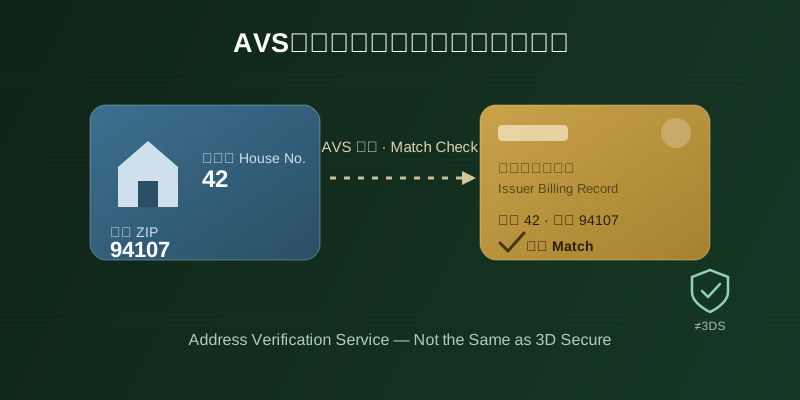
- ✓Does the house number and ZIP code you entered as the billing address exactly match what your card issuer has on file — those two fields are what AVS actually checks, not the exact spelling of the street name
- ✓Have you moved recently without contacting your card issuer to update your billing address record, so the address you type is new but the issuer's file still shows the old one
- ✓Are you using a family member's or friend's card but entering your own current address instead of the cardholder's address on file with the issuer
- ✓Was the decline reported as an identity verification failure (a 3D Secure prompt or code) or as an address mismatch/risk flag — these point to different fixes, so don't conflate them
- ✓If the address is confirmed correct, the issue may be the merchant's or gateway's own AVS risk tolerance setting; try a different payment method or contact support for the exact decline reason
1. The scenario: funds available, identity verified, charge still declined
Plenty of users hit a confusing wall when subscribing to services like ChatGPT, Claude, or Midjourney: the card has enough balance, and steps like entering a one-time code or confirming in a banking app go through fine — yet the subscription charge is still declined outright, or flagged for manual review. Digging further, the culprit is often an overlooked step: the billing address entered at checkout doesn't match the billing address on file with the card issuer, which trips an AVS (Address Verification System) mismatch.
2. What AVS actually checks: house number and ZIP, not the full address text
This is a technical detail most people don't know: AVS generally does not compare the full street address text word for word. What it typically compares is the numeric portion — the house/street number and the ZIP or postal code. According to Mastercard Gateway's official documentation, AVS compares the billing address submitted at checkout against the issuer's record and returns an AVS response code indicating the degree of match. Even if the street name spelling, capitalization, or the presence of a unit/apartment suffix differs, as long as the house number and ZIP match numerically, AVS typically still reports a match. Conversely, even a word-for-word identical street address can fail if the house number or ZIP digits are off — for example, when an apartment unit number gets entered where the street number belongs. That's a common source of false AVS mismatches.
3. AVS and 3D Secure are two different mechanisms, easily confused
Many people lump "charge declined" together with "identity verification failed," but AVS and 3D Secure (3DS — the one-time code or bank app confirmation flow) verify two entirely different things: 3D Secure confirms that the person submitting this transaction is the actual cardholder, via a one-time passcode or push confirmation in a banking app. AVS confirms whether the billing address information the customer provided matches the billing address registered with the card issuer for that specific card — it has nothing directly to do with whether the person operating the checkout is the cardholder. In other words, a cardholder can personally enter the passcode and confirm the transaction (3DS passes), and the charge can still be declined or flagged as high-risk if the billing address entered is the customer's current residence rather than the address on file with the card issuer. That's the technical reason behind the "identity verified, charge still declined" scenario at the top of this article.
4. Which address belongs in the billing address field: the issuer's record, not shipping or current residence
The correct value for the "billing address" field at checkout is the address on file with the card's issuing bank — not a shipping address (irrelevant for a digital subscription anyway) and not necessarily your current residence, since those aren't always the same address. Common triggers include: moving to a new home without contacting the card issuer to update the billing address record, then habitually typing the new address at checkout; or using a card that belongs to a family member or friend and entering your own address instead of the cardholder's address on file. In either case, even with a perfectly healthy card and sufficient balance, the AVS check can still fail because the addresses don't line up.
5. Merchants handle AVS failures differently: some decline outright, some just flag
One point worth stating plainly: whether an AVS mismatch leads to an outright decline or just a risk flag that still allows the payment through depends on the risk policy configured by the specific merchant or payment gateway processing that transaction — there is no single rule that applies uniformly across every platform. According to Stripe's official documentation, AVS results can be configured with different levels of strictness; a merchant can choose to block only transactions with a clear address mismatch, or apply a stricter policy that blocks a wider range of at-risk transactions. Stripe's own documentation also acknowledges that legitimate payments can fail AVS checks — for instance, when a customer simply mistypes an address, or moves without notifying the card issuer, resulting in a real cardholder being blocked purely on an address mismatch. So it isn't accurate to assume every AVS mismatch automatically means a hard decline; the actual behavior depends on the risk tolerance configured by the specific payment channel the AI service provider uses.
6. What to check if you hit an AVS decline: verify the address first, then contact the issuer
If you suspect a charge failed because of an AVS address mismatch, a practical troubleshooting order looks like this: first, pull up your card statement or log into your banking app to check the billing address currently on file, and compare the house number and ZIP against exactly what was entered at checkout. Second, if you find the address on file is outdated (for example, after a recent move), contact your card issuer directly to update the billing address record — that's the most direct fix. Third, if the address information checks out and matches, the problem more likely lies in the risk rules of the payment gateway the AI service provider uses; try a different card, a different payment method, or contact support for the specific decline reason code. It's not advisable to repeatedly retry the same card without first confirming the actual cause — repeated failed attempts can themselves increase the likelihood the account gets flagged as higher risk.
7. To be clear: exact AVS rules and decline handling vary by issuer and gateway
It's worth stating plainly: the exact logic AVS uses (such as whether street-level address checking is supported, or how well it supports international cards) and the exact handling of a failed check (outright decline versus a risk flag) vary by card issuer, card network (Visa, Mastercard, etc.), payment gateway, and the specific merchant's configuration — there is no single standard that applies universally. AVS support and conventions themselves differ across regions such as the US, Canada, and the UK, and some international card issuers don't support AVS checks at all. This article makes no uniform claim about any specific issuer's or gateway's AVS decision rules; for an actual declined charge, defer to the specific explanation given by the card issuer, merchant, or payment gateway involved in that transaction.