
Verification Checklist
- ✓After the card number and expiry autofill on checkout, did you check whether the CVV field was actually autofilled by the browser, or does it need to be typed in fresh against the back of the physical card
- ✓If several similar cards are saved under the same profile (a secondary card with the same name, or an old card replaced by a new one), does the autofilled card number actually match the physical card you mean to use this time
- ✓After the first "invalid CVV" failure, did you clear the field and re-enter it character by character, or did you just hit submit again without double-checking
- ✓After two or more consecutive CVV failures, did you stop and verify another way (like checking your bank's app for the card details), instead of trying a third or fourth time
- ✓If the card is already showing as locked or transactions keep getting declined, did you contact your card issuer's support right away instead of continuing to retry on the checkout page
1. Why the CVV so often comes out wrong: browsers barely store it
When you fill out a card form on an AI subscription checkout page, Chrome, Safari, and Edge don't handle payment autofill consistently: the card number, cardholder name, and expiry date are all typically saved and autofilled, but the CVV (also called CVV2, CVC, or the security code — usually three digits on the back of the card, four on the front for Amex) is deliberately not persisted by most browsers by default for security reasons. Apple's own support documentation states plainly that, for security, Safari does not store the credit card security code, and it must be entered manually every time. Chrome's official help documentation likewise describes CVV autofill as currently limited to a small set of officially partnered cards and regions, not a general capability. In practice this means that even when the card number and expiry fill in perfectly, the CVV field is often either blank or holding a stale leftover value that needs to be retyped against the physical card; and if several cards are saved under the same account (a primary and secondary card, or an old card kept around after being replaced), autofill can also pull in the wrong card number entirely while the CVV field doesn't update to match — a combination that looks "filled in" but is actually wrong.
2. Why retrying submit repeatedly looks like fraud probing to issuers
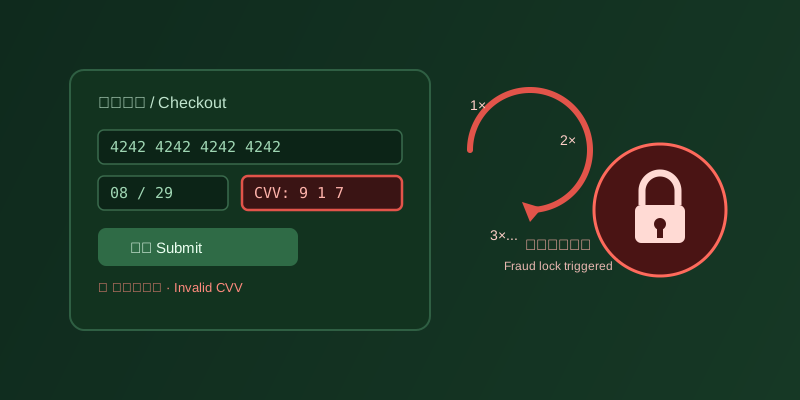
The problem isn't getting the CVV wrong once — it's what happens next. Issuer and card network fraud systems are built to closely monitor CVV validation failures, because the CVV exists specifically to verify that whoever is making the transaction is actually holding the physical card. A genuine cardholder who mistypes it will normally stop, check the number, and re-enter it once. Someone running a fraud attempt, on the other hand, typically has only the card number and expiry (obtained through a data breach or phishing) and has to guess or brute-force the CVV, which means submitting many different CVV combinations against the same card in rapid succession. That exact pattern — a high-frequency, short-interval sequence of failed validations against a single card — is one of the core signals fraud systems use to identify what's known as a card testing or enumeration attack. In other words, if you don't realize the CVV was autofilled wrong and instinctively hit submit over and over, the sequence your account generates is, from the system's point of view, nearly indistinguishable from an actual fraud probe. The fraud system has no way to tell "this is really the cardholder" from "this is an attacker" — it only sees repeated failures on one card in a short window, and triggering a temporary restriction or lock to protect the cardholder's funds is a completely plausible response.
3. How many failed attempts triggers a lock: there's no published universal number
It's worth being explicit here: there is no single, publicly disclosed threshold for exactly how many consecutive CVV failures triggers a lock across issuers. The specific rules vary by bank, by card network (Visa, Mastercard, and others), and by the individual fraud system in use, and issuers don't publish the precise triggers for their anti-fraud logic. Numbers like "3 attempts" or "5 attempts" that circulate online mostly lack an authoritative source, and this article deliberately avoids citing any specific attempt count as if it were a universal standard. What is confirmed and publicly documented is that card networks require issuers to monitor signals like CVV validation failures and build fraud rules around them specifically to detect card testing and enumeration attacks — attacks that are themselves characterized by a burst of attempts against different CVV or card number combinations in a short time. The exact number of attempts that triggers a lock, and how long that lock lasts, depends entirely on your own issuer's policy and can differ meaningfully between banks and card products.
4. The right way to handle it: verify carefully, don't just resubmit
When the CVV autofills wrong or checkout returns an "invalid security code" error, the correct first move is to stop, clear the CVV field, pull out the physical card (the back for most cards, the front for Amex), and carefully match every digit before re-entering and submitting once — not to hit submit again on the assumption that another try might just happen to work. If the checkout page has several similar cards saved under the same browser profile, it's also worth confirming the autofilled card number itself is the one you actually intend to use this time; a mismatched card number will fail even with a perfectly correct CVV, and that kind of failure is easy to misdiagnose as a CVV problem and retry blindly. The underlying principle is simple: every submission should follow a verification step, not replace one — the submit button isn't a tool for trial and error.
5. If the card is already locked: contact the issuer, don't keep trying
If transactions are already being repeatedly declined, your banking app has surfaced a security alert, or you've received a notice that the card is temporarily locked, the right move is to stop attempting payment on the checkout page immediately and contact your card issuer directly — through the bank's in-app support, the customer service line, or the number printed on the back of the card — and explain plainly that a CVV entry error on a specific site, followed by repeated resubmissions, appears to have triggered a fraud hold, and ask them to verify and help lift the restriction. Continuing to retry on the original page not only fails to fix anything, it feeds the fraud system more consecutive-failure signal, potentially extending the lock or escalating it into a tighter restriction. Proactively contacting the issuer and explaining the situation is typically the most direct and effective way to get a temporary hold like this lifted.
6. Bottom line: a wrong CVV is routine, repeated retries are the real risk
Because of how browsers handle CVV for security reasons, getting it wrong at checkout is a normal, unremarkable hiccup — nothing to worry about on its own. What actually deserves caution is the habit of resubmitting without verifying, because that pattern overlaps heavily with what fraud probing looks like to an issuer, and it can produce a temporary lock that was entirely avoidable. Two things worth remembering: stop and verify carefully after the first failure instead of trying again on a hunch, and if the card is already locked, contact the issuer right away instead of continuing to gamble on the checkout page.