
Verification Checklist
- ✓Before closing a virtual card, have you checked its transaction history or statement to confirm there is no refund, chargeback, or merchant dispute still in progress under that card
- ✓When you requested the AI subscription refund, did you save the refund date and reference number shown on the merchant's dashboard, so you can track where the money actually is
- ✓If a refund is late, is the first person you contact the virtual card provider rather than the original merchant—the merchant can only confirm it initiated the refund, not where the money landed
- ✓If the provider says the refund was credited to your account balance, have you confirmed whether that balance can be withdrawn or transferred, rather than assuming it will just apply to future charges
- ✓Have you asked your specific virtual card provider directly how they handle refunds sent to an already-closed card—policies are not standardized across providers, so another platform's experience does not necessarily apply
1. The problem: the merchant says "refunded," but whose account actually received it
When you pay for an overseas AI subscription (ChatGPT, Claude, Gemini, and similar services) with a virtual card and later request a refund—whether through the merchant's own refund flow or an App Store/Google Play in-app purchase refund—the merchant or platform dashboard almost always shows a single line: "refund processed, sent back to your original payment method." That statement itself is accurate—card network rules generally require refunds to go back to the original payment method, not to a different card or account. The uncertainty is in what "original payment method" means in practice: if that virtual card had already been closed by you, or had simply expired, by the time you requested the refund, the merchant's system can still display "success," while what actually happens once the refund reaches the card network and the issuer—whether it's accepted, bounced back, or credited somewhere you don't expect—is something the merchant's "processed" message tells you nothing about.
2. Why: refunds travel the card network's settlement rails, which recognize an account and card number, not you
To understand where this uncertainty comes from, it helps to know how "original payment method" actually works. A refund isn't the merchant handing money directly to you—it's the merchant, through its acquiring bank, sending a refund instruction into a card network like Visa or Mastercard, which then routes the funds based on the account identifier and card number recorded on the original transaction, down to the corresponding issuer (for a virtual card, that's the virtual card provider). The mechanism recognizes "the account and card number tied to this original transaction," not "the real person requesting the refund"—which is also why a refund can't simply be redirected to a different card in your name: the whole system is designed around returning funds to the same account identifier. Once that identifier (the virtual card) has been closed or has expired, the refund arriving at the virtual card provider's end is, from the provider's perspective, "money aimed at a card that no longer works." What happens next is entirely governed by that provider's own internal accounting rules—there is no single, industry-wide standard that a merchant could predict in advance.
3. Two possible outcomes: rejected back to the merchant, or credited to the account balance
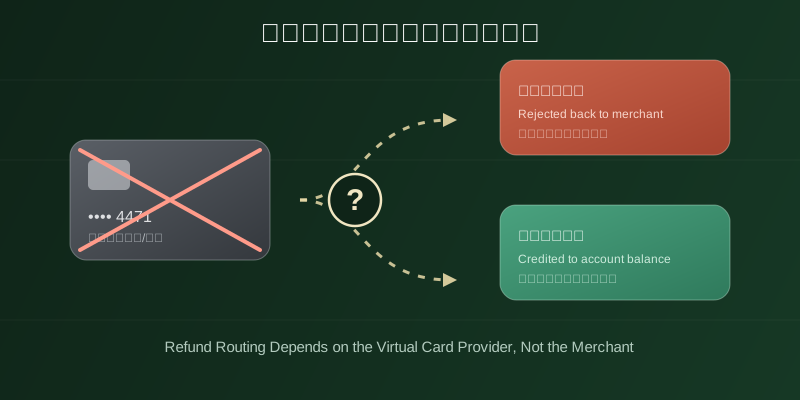
Because there's no unified rule for refunding a card that no longer works, the actual result usually falls into one of two buckets, and which one depends on how the virtual card provider itself is designed. In the first case: if the entire underlying account behind that virtual card has also been closed, the issuer may simply reject the refund outright, and the funds bounce back through the acquiring bank to the original merchant—at which point you'd need to go back to the merchant and have them try an alternative method, like a bank transfer to a different account. In the second case: many virtual card providers are designed so that closing a card only retires that specific card number, while the underlying account (your balance account on that virtual card platform) remains open. In that setup, the refund is likely to be recognized as "money aimed at this account" and simply credited to the account balance, rather than being rejected just because the specific card number is inactive. Both outcomes are technically reasonable, but whether you land in the second case—and whether that credited balance can then be withdrawn or transferred—depends entirely on how your specific virtual card provider handles it. There's no publicly committed, industry-wide rule here; you need to check directly with your provider.
4. If a refund is stuck: contact the virtual card provider first, not the original merchant
If you submitted a refund request and the money never shows up, the instinct for many people is to go back to the original merchant and demand they "process it again." That instinct is aimed at the wrong party: all a merchant can confirm—and all it's responsible for confirming—is that the refund was initiated and sent into the payment network on their end. What happens to that refund inside the card network's settlement rails, and whether it was ultimately received by the virtual card account, is invisible to the merchant's own system and outside its control—that information only exists inside the virtual card provider's own accounting system. So the correct first point of contact is the virtual card provider's support or technical team, not the merchant: give them the refund reference number and initiation date the merchant provided, and have them check whether the money was credited to the account balance, rejected and returned, or is still in transit through the settlement network. That's the path to an actual answer. Going back and forth with the merchant usually just gets you the same non-informative "our system shows it was refunded" response.
5. What to check before closing a virtual card
Rather than chasing down a stuck refund after the fact, it's more practical to manage the risk before you close a card. Two concrete steps help. First, before closing a virtual card, go through its transaction history or statement line by line and confirm there is no refund, chargeback, or merchant dispute still in progress—if any payment is sitting in a "refund initiated but not yet received" state, hold off on closing the card until that refund is confirmed received or its outcome is clear, so the closure doesn't land in the middle of a refund still settling. Second, if you must close the card now for another reason (say, replacing it), contact the virtual card provider's support beforehand and ask directly: "if a refund arrives after this card is closed, how exactly will it be handled?" Asking that question up front, rather than after the money has already gone somewhere unclear, is far more reliable than guessing after the fact—providers genuinely differ on this point.
6. Takeaway: a refund to a closed card is an account-level question, and the provider has the answer
When an AI subscription refund is described as going "back to the original payment method," it means the refund request is routed, under card network settlement rules, to the account tied to the card you used—not handed directly to you as a person. Once a virtual card is closed or expired, whether that money ends up rejected back to the merchant or credited to the account balance depends on the virtual card provider's own internal rules, and different providers don't handle it the same way—there's no public, unified industry standard. If a refund is late, the first call should go to the virtual card provider, not the original merchant, because only the provider's own accounting system can see where the money actually went. And the simplest way to avoid this problem in the first place is to confirm there's no refund or dispute still in progress before you close a virtual card.