
Verification Checklist
- ✓Is what you received a bank prompt asking you to actively confirm a verification request, or a direct "renewal failed / payment declined" notice with no action to take — these mean different things and call for different next steps
- ✓If it's a request needing your confirmation, have you checked that the merchant name and amount in the text actually match your AI subscription before tapping confirm, rather than confirming on autopilot
- ✓Have you checked your bank's app for a "trusted merchant" or "verification-exempt merchant" list feature, and whether you can proactively add this AI service to it to reduce future re-challenges
- ✓If renewals keep failing, have you confirmed your very first subscription charge actually completed a full 3D Secure challenge (rather than being silently skipped), since a skipped first challenge can also mean no MIT credential ever got established
- ✓Have you called your card issuer to explain this is a recurring subscription renewal rather than an unrecognized charge, and asked them to relax the re-verification requirement for this specific merchant going forward
1. The pattern: the first charge needs a code — why does the renewal ask again?
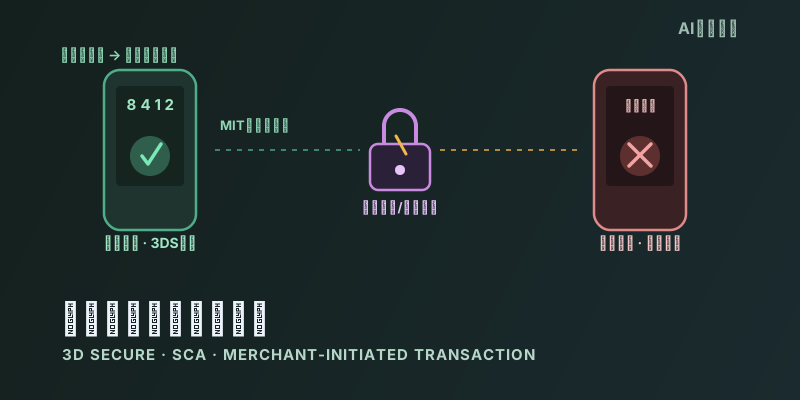
A common flow for a first-time subscription to an overseas AI service: enter the card number, and the bank immediately sends a one-time code by text, or pushes a fingerprint/Face ID confirmation through its app — only once that step clears does the charge actually go through. That's expected: the EU's second Payment Services Directive (PSD2) requires the cardholder's own bank to apply Strong Customer Authentication (SCA) to remote electronic payments, and 3D Secure (3DS) is the technical protocol that carries out that authentication. What's confusing is that the same card, the same subscription, renewing a month later, sometimes triggers another verification request that needs a fresh tap to confirm — while for other users, the renewal goes through with zero friction. That difference isn't random; it comes down to a specific mechanism that's easy to get wrong in implementation.
2. The normal mechanism: renewals should be classified as MIT and skip re-verification
PSD2's supporting Regulatory Technical Standards (RTS, Commission Delegated Regulation (EU) 2018/389) split payment transactions into two categories: Cardholder-Initiated Transactions (CIT), where the cardholder is present and personally triggers each payment, and Merchant-Initiated Transactions (MIT), where the merchant fires a follow-up charge under a mandate the cardholder previously granted, with no cardholder present and no cardholder interaction at all. CITs generally require SCA; the European Banking Authority (EBA) has explicitly named utility bills, TV and mobile subscriptions, and digital service subscriptions as textbook MIT examples, and confirmed that card-based MITs fall outside the scope of SCA. Applied to an AI subscription: if the first charge itself completed a full 3DS challenge (earning strong authentication from the issuer), and the merchant's payment gateway correctly recorded that mandate as a "future charges authorized" credential — Visa's Stored Credential framework and MIT indicator, or the equivalent protocol identifier on other card networks — then every subsequent monthly renewal can, in principle, be submitted as an MIT and skip the 3DS challenge entirely, going straight through. That's the exemption path the rules themselves were designed around; it isn't a special favor from any one platform.
3. Why it breaks: a mis-tagged MIT flag, or the issuer choosing to challenge anyway
The failure usually traces to one of two places. The first is the merchant's own payment gateway implementation: for an MIT to be correctly recognized as SCA-exempt, the merchant's system must accurately record and correctly echo the right credential on every follow-up request — Visa's Stored Credential indicator, the original transaction ID carried into each subsequent MIT request, and similar mechanics on other networks. If the payment service provider (PSP) or acquiring gateway the AI vendor uses has a gap in that integration — submitting the renewal as an ordinary card-on-file charge instead of correctly flagging it as an MIT under an established mandate — the issuer never sees a request eligible for the exemption, and evaluates it under the default rules for a regular remote transaction instead. The second place is the issuing bank's own risk engine: even when the merchant tags the MIT correctly, whether to honor that flag is still, per Visa's own PSD2 implementation guidance, optional for the issuer to act on. If the issuer's fraud model flags the merchant category, amount range, or region as higher risk, it can still trigger a challenge even on a properly flagged MIT. Because the renewal itself fires automatically with no cardholder present, once the issuer kicks off a challenge flow requiring cardholder interaction, that transaction is almost certain to fail simply for lack of a response — nothing to do with anything the user did.
4. Two different signals: a verification text vs. a straight decline
What users actually see splits into two patterns, and they mean different things. The first is receiving a bank text or app push asking you to complete verification — this means the renewal request is still sitting in a state waiting for cardholder interaction, and the bank has given you a window to rescue it. As long as you confirm within that window (after checking that the merchant name and amount genuinely match your AI subscription, not a phishing attempt), the renewal will usually go through and complete the charge. The second pattern is no actionable prompt at all — just a direct "renewal failed / payment declined" notice. That means the issuer's challenge flow already timed out and failed at the system level with no cardholder response, and there's nothing left to wait for; a fresh verification text isn't coming because that transaction cycle is already closed, and what's needed instead is the next recovery step (see below), not more waiting. Confusing these two signals is the main reason people get stuck in a loop of repeated declines without understanding why.
5. What to actually do: confirm the text, or set up a trusted merchant
If what you get is a request that needs a tap to confirm, and the merchant name and amount genuinely match your AI subscription, it's usually reasonable to confirm it promptly — this isn't the typical phishing pattern (phishing texts usually push you to an unfamiliar link asking for a full card number or password, while a legitimate 3DS challenge only requires action inside your own bank's app or its native verification page). If renewals keep failing to the point where you have to re-add the card each time to get it working again, a more proactive step is checking your bank's app for a "trusted merchant," "whitelisted merchant," or "verification-exempt" feature (naming varies by issuer; some frame this under a "trusted beneficiaries" list) and adding this AI service to it, which reduces the odds of a re-challenge on future renewals. Calling the issuer's customer service directly and explaining that this is a recurring subscription renewal rather than an unrecognized charge, and asking them to relax verification for this specific merchant, is another direct path. If renewals still fail after trying these, switching to a different card — especially from a different issuer, since risk policies vary — and completing a fresh first charge with a full 3DS challenge can re-establish a clean MIT credential from scratch.
6. Bottom line: not a mistake you made, just an exemption that didn't connect properly
Requiring a code on the first AI subscription charge is expected behavior under PSD2/SCA; subsequent renewals should be exempt from that same challenge under the MIT rules, and that's the path the regulation itself was built around. A renewal that triggers another verification request, or fails outright, usually isn't a sign the user did anything wrong — it's the merchant's payment gateway failing to correctly pass the MIT/Stored Credential flag, or the issuer's risk engine actively choosing not to honor the exemption for that renewal. Because the renewal fires with no cardholder present to respond to a challenge, once triggered it's close to certain to fail. Confirming a legitimate verification text promptly, and proactively contacting the issuer or setting up a trusted merchant in the banking app when declines keep recurring, are the most direct things a user can actually do about it.