
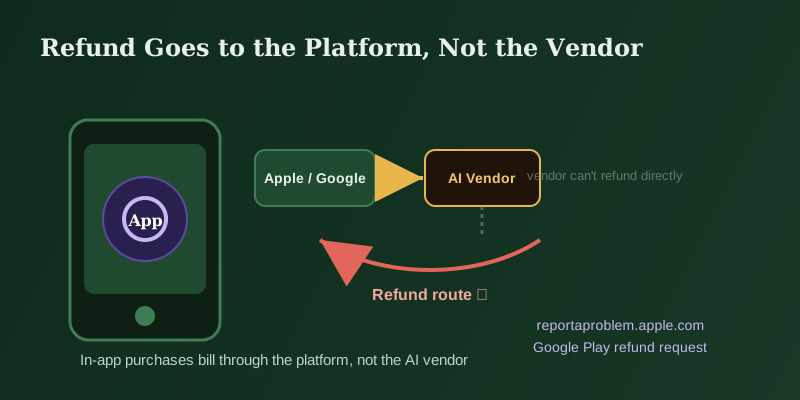
Verification Checklist
- ✓Do you remember whether you originally subscribed to ChatGPT Plus, Claude Pro, or similar through an App Store/Google Play in-app purchase, or by entering a card directly on the vendor's website — the refund channel is completely different for each
- ✓Before requesting a refund, have you confirmed the correct platform to go through, instead of assuming the vendor's own help center is the right place to start
- ✓If it was an iOS in-app purchase, do you know the correct entry point is Apple's "report a problem" page (reportaproblem.apple.com), not the in-app support chat inside the ChatGPT or Claude app itself
- ✓If it was an Android in-app purchase, do you know you can file a refund request through Google Play's own process, while also knowing that contacting the developer directly can sometimes help in parallel
- ✓Do you understand that canceling a subscription (stopping future renewals) and requesting a refund (getting money already charged back) are two entirely different actions — canceling alone does not automatically return any money
1. The in-app purchase money chain: it lands in the platform's pocket first, then gets split with the vendor
When you subscribe to ChatGPT Plus, Claude Pro, or a similar AI service through an iOS or Android in-app purchase, the actual billing relationship isn't "you pay the AI vendor directly" — it's "you pay Apple or Google, and Apple or Google splits that revenue with the vendor according to the platform's own cut." That means the charge on your card statement typically shows up as something like "APPLE.COM/BILL" or a Google Play billing descriptor, not the vendor's own merchant name. That chain determines who actually controls the money and who has the authority to process a refund: whoever collected the payment is the one with the power to reverse it. Even if the AI vendor wanted to refund you directly, it has no direct access to that transaction inside this billing structure — at most it can assist or point you in the right direction, but the platform is the one that has to actually execute the refund.
2. Website subscription vs. in-app purchase: two completely different refund paths
The same AI vendor often offers both a direct website subscription and an in-app purchase option, and the two do not share a refund process at all. If you subscribed by entering a card or PayPal account directly on the vendor's own website, the vendor itself (or the payment processor it uses) is the one who charged you, and going through the vendor's own help center and support flow is generally the correct path — the vendor genuinely has the authority to process that refund internally. But if you opened the app on your phone, tapped subscribe inside the app, and the native Apple or Google payment confirmation sheet popped up to complete the purchase, that transaction falls under App Store or Google Play jurisdiction from that moment on, and the refund channel shifts to the platform accordingly. Plenty of people simply can't remember which channel they used — especially if they browsed the pricing page on the web first and then completed the purchase on their phone out of convenience — which is exactly why refund requests so often get filed through the wrong channel. It's worth building the habit of noticing whose payment confirmation screen actually appears at checkout.
3. What happens when you go to vendor support with the wrong channel
If a subscription was purchased through the App Store or Google Play but the user contacts OpenAI, Anthropic, or another vendor's own support directly asking for a refund, the reply is usually unambiguous: "this subscription was purchased through the App Store (or Google Play), please contact Apple (or Google) directly for a refund, we're unable to process this transaction on our end," typically with a link to the relevant platform's refund instructions attached. This isn't the support team being evasive — it's a hard boundary set by how the billing system itself works, since the vendor genuinely lacks the authority to reverse a payment the platform collected. The problem is that the back-and-forth itself costs time: filing a support ticket, waiting for a reply, being told you went to the wrong place, then filing again with the correct platform. That round trip alone can add a day or two of delay that could have been avoided by going straight to the correct platform's refund entry point from the start.
4. Where to actually file: Apple's "report a problem" page for iOS, Google Play's refund request for Android
If the subscription was confirmed as an iOS App Store purchase, the correct place to request a refund is Apple's "report a problem" page (reportaproblem.apple.com) — sign in with the Apple ID used at purchase, locate the specific subscription charge in your purchase history, and submit the refund request with a reason. You can also check the subscription's status under Settings on your iPhone by going into your Apple ID account's Subscriptions page, but the actual refund request still has to go through reportaproblem.apple.com specifically — the cancel button in Settings only stops future renewals and does not refund anything already charged. If the subscription was a Google Play purchase, you can file a refund request from within your Google Play purchase history, describing the purchase date and reason. Google Play's own help pages also note that for many apps, contacting the developer directly is a valid parallel channel, and the two paths aren't necessarily mutually exclusive — but for subscription in-app purchases specifically, it's usually Google Play's own refund process that actually executes the charge reversal. Whichever platform you use, it helps to state the purchase date, amount charged, and reason for the refund clearly so reviewers can verify the claim.
5. Review turnaround varies by case — don't expect one fixed number of days
Neither Apple nor Google publicly commits to one fixed refund processing timeline on their official help pages — actual review time varies depending on the reason given, how long ago the purchase happened, and the account's refund history, and the official pages generally only say results will be sent by email after review, without a precise day count. Rather than fixating on exactly how many days it will take, a more practical approach is: after submitting the refund request, watch the email address tied to your Apple ID or Google account, since the outcome is typically communicated that way; if a meaningful stretch of time passes (say, one or two weeks) with no response at all, check the status again through the same platform's refund request entry rather than going back to ask the AI vendor's support team for an update — the review authority and progress both sit on the platform's side, so the actual timeline is whatever the official page tells you at the time you file.