
Verification Checklist
- ✓Before deleting, did you go to the subscription/billing page specifically and click cancel until it explicitly showed "cancelled" or "won't renew"
- ✓Did you get a cancellation confirmation email, or a screenshot of the confirmation page
- ✓If you signed up via third-party login (e.g. Google), does deleting it revoke only the login, not a separate underlying subscription record
- ✓If billed after deletion, do you have both the account-deletion screenshot/email and the card charge record to line up the timeline
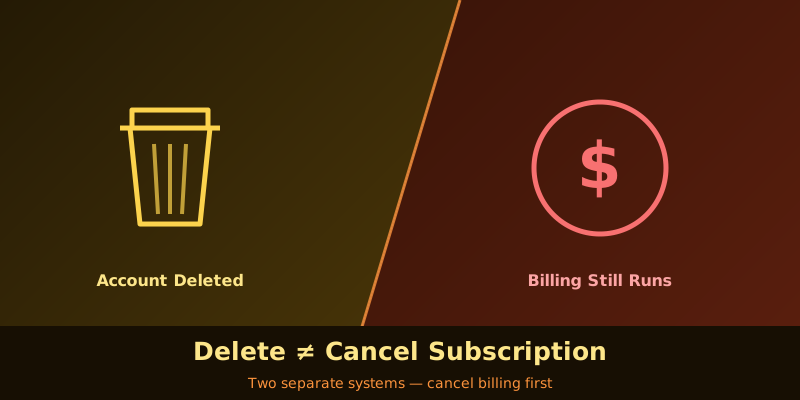
1. Deletion and cancellation are simply not the same action
"Delete account" wipes your identity data — email, password, chat history, generated content, login credentials — and clears or marks them for removal so you can no longer sign in as that user. "Cancel subscription" issues a completely separate billing instruction: tell the billing engine not to charge this card next cycle. In most products' original architecture, these two things belong to two different back-end systems that were never designed to talk to each other. The account system answers "who is this person and can they log in"; the billing system answers "does this card, this subscription, keep getting charged." Deleting the account doesn't automatically trigger the other unless engineering specifically wired that link — and a lot of platforms, especially smaller AI tools, never did.
2. Why it ended up as two separate buttons: architecture, not malice
Most AI products build their account system and billing system as two separate pieces from day one — the account system is often custom-built or runs on something like Auth0 for login, permissions, and profile data; billing is commonly outsourced to a third party like Stripe, Chargebee, or Paddle to handle cycles, charges, and invoices. The two sync through API calls. Ideally, deleting an account should first call the billing system's cancel-subscription endpoint, confirm it succeeded, and only then wipe the account. In practice, "delete account" is often treated as a minor, low-priority feature to build, and teams frequently only handle the cleanup on the account side, never calling the billing endpoint at all. It's rarely deliberate — the feature just was never seriously designed end-to-end, and that gap between "should sync" and "actually syncs" is where the ongoing charges come from.
3. The worst part: once the account is gone, so is your way to cancel
Simply forgetting to cancel at least leaves you able to log back in and fix it. Getting billed after deletion is much harder — you can't log in, there's no settings page with a cancel button to find, and you may not even receive notification emails since the account tied to that address no longer exists. The only evidence you have is an ongoing charge on your card or virtual card statement. The only path forward is contacting support directly, but support systems are usually keyed off account IDs too, so a deleted account may mean they can't pull up your subscription record either — you'll likely need to supply the charge itself, your registered email, and the last few card digits for manual verification, a process that takes considerably longer than a normal cancellation would have.
4. Where this trap shows up most: three recurring patterns
This tends to happen in three situations. First, the "delete account" button and the "cancel subscription" button sit in entirely different settings sections, and users simply assume deleting the account takes the subscription with it, never visiting the billing page to confirm. Second, tools that let you sign in through a third-party login (say, one-click Google sign-up) — deleting that login often only revokes the authorization, while a separate subscription record tied to your email address stays alive underneath, unconnected. Third, a platform going through an acquisition, migration, or shutdown, where support response and system maintenance are already degraded — even a properly submitted cancellation request can get lost in the handoff chaos. The simplest way to check whether you're at risk is to go through the subscription management page and explicitly cancel before you ever assume account deletion handles it.
5. The one check to run before you delete an account
The correct order is always: cancel first, confirm it took, then delete the account — never the reverse. In practice, go to the dedicated subscription or billing management page (usually a different location from "delete account"), find the active plan, click cancel, and wait until the page explicitly shows "cancelled" or "won't renew after this period." If the platform supports it, screenshot that confirmation page and check for a cancellation confirmation email as well. Only once both of those are confirmed should you go back and delete the account. The extra two minutes this takes is far cheaper than ending up locked out with no way to verify subscription status at all.
6. Still getting billed after deletion — what support will say
Contact support about this and the common response is something like "account deletion is not the same as cancelling the subscription; please provide your registered email and last four card digits to verify." That statement is accurate — it's describing a real product design fact, not a brush-off — the problem is it should have been surfaced clearly on the deletion page itself, not explained after the fact once you've already been charged extra. Keep a screenshot or email confirming the account was deleted, plus the actual charge record from your card or virtual card — lining up those two timelines is enough to prove the account and subscription states never matched. Most legitimate platforms refund charges that happened after deletion once the evidence is clear; if a platform stalls and the charge went through a credit card or virtual card, a chargeback is worth considering.
7. How a virtual card cuts the line before you ever delete
Since account deletion can't be trusted to sync cancellation automatically, the safer move is to put the actual stop on the payment side rather than rely on internal platform logic that may or may not exist. With a US virtual card provider like rdvcc.com, issuing a separate card per subscription lets you zero out the limit or freeze that card before you delete the account. Even if the account and billing systems genuinely never talk to each other and the billing engine is still queued up to charge, the request gets rejected right at the card level — you don't have to wait on an engineering team to fix a linkage that may not have ever been built. The control stays with the cardholder, not with whatever code may or may not exist behind the delete button.
8. Funding with stablecoins so a post-deletion charge has nothing to draw on
If the virtual card is funded with stablecoins on an as-needed basis, this backstop gets even more solid — you load exactly what USDT or USDC you deposit, and once you've cancelled and are about to delete the account, you simply stop topping it up. The balance runs dry fast, so even if the billing system genuinely missed the cancellation and tries to charge anyway, it fails on insufficient funds. When stablecoins are scattered across chains and need consolidating into whatever the card requires, a non-custodial service like AllSwap lets you swap first and fund after, with no account required and failed swaps refunded automatically. Small, as-needed top-ups paired with "stop funding right before deletion" mean account deletion never has to depend on whether the platform's internal linkage is actually reliable.
9. Bottom line: deleting the account is not a substitute for cancelling
Account deletion touches the identity system; cancellation touches the billing system — whether the two are linked at all is entirely down to how a given platform's engineers built it, not a reasonable user assumption. Instead of assuming "the account's gone, so surely nothing gets charged," split it into two explicit steps: cancel and confirm it in the subscription management page first, then delete the account. Back that up on the payment side with a per-subscription card that you zero out or freeze right before deletion — that way, even if the platform's internal linkage genuinely doesn't exist, the charge itself simply can't happen. Deleting an account has never been a reliable way to stop billing. Cancelling the subscription is.