
Verification Checklist
- ✓Have you checked the vendor's own enterprise docs to confirm your actual subscription tier supports SCIM auto-deprovisioning, versus only supporting SSO login while account creation/removal still requires manual admin action
- ✓If your tier does support SCIM, have you confirmed the sync's actual trigger mechanism (real-time webhook vs. periodic batch job), rather than assuming "supports SCIM" means "takes effect instantly"
- ✓Does your offboarding process include a step to log into the AI platform's own admin console and check the account's real status, rather than stopping once the SSO side shows "disabled"
- ✓Does the platform offer a "force sign out of all devices/all active sessions" admin action, and is that step written into your offboarding checklist as mandatory rather than optional
- ✓For tiers that don't support SCIM auto-deprovisioning, have you built a manual backup process where IT logs into the AI platform's console on offboarding day to disable or remove the account, instead of relying solely on the SSO side's status
1. "SSO disabled" and "AI tool access revoked" are not the same thing
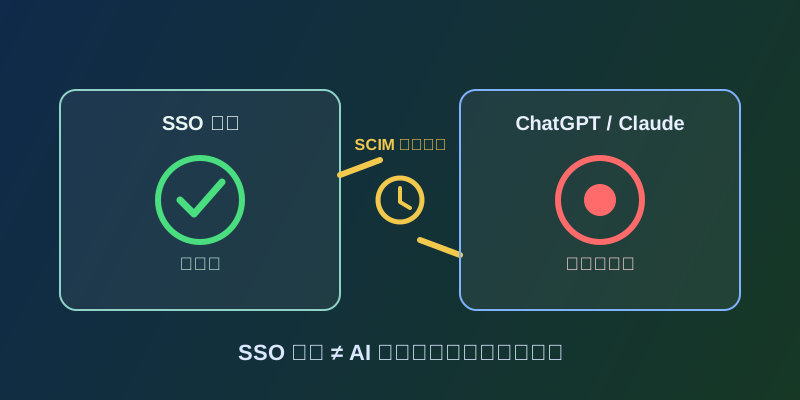
Once a company grows past a certain size, it almost always adopts an identity provider (IdP) like Okta, Azure AD (Microsoft Entra ID), or Google Workspace for single sign-on, so employees use one corporate identity to log into ChatGPT Team/Enterprise, Claude for Work, and every other SaaS tool, AI services included. The intended end-of-life flow is this: an employee leaves, HR flags them as terminated, that triggers the identity provider to disable their SSO account, and SCIM (System for Cross-domain Identity Management, an IETF-standardized protocol — see RFC 7644 in the references below) syncs that state change out to every connected downstream app, which then automatically disables or deletes the corresponding account and revokes access in real time. The flaw in this picture is straightforward: disabling the SSO account only means the employee can no longer log in through the "corporate SSO" path going forward. It doesn't necessarily trigger the downstream AI platform to actually revoke access, and it doesn't necessarily invalidate a login session the employee already established — these are two separate mechanisms. "SSO is disabled" cannot be assumed to mean "AI tool access has already been revoked."
2. First link: does the subscription tier actually support SCIM auto-deprovisioning
Not every subscription tier of every AI service supports SCIM auto-deprovisioning. Many vendors reserve SCIM directory sync for their higher-priced tiers, leaving lower tiers with SSO login authentication only — account creation and removal there still requires IT staff to log into the AI platform's own admin console and act manually. Two examples verified for this piece: Anthropic's official help center states that JIT (Just-in-Time) provisioning is available for Team, Enterprise, and Console organizations, but SCIM directory sync (automated account creation and deactivation) is available only for Enterprise and Console organizations — not the Team tier. OpenAI's official help center similarly states that SCIM/AD group sync is a capability of the higher ChatGPT Enterprise, Edu, and Teachers tiers, while ChatGPT Business has no SCIM/AD group sync at all, meaning provisioning and deprovisioning there are entirely manual. In other words, if a company's actual purchase is an entry-level tier, an HR-triggered SSO disable on offboarding day may trigger nothing at all on the AI platform's side — this has to be verified against your actual tier first, not assumed from "we use SSO, so offboarding must be automatic."
3. Second link: SCIM sync isn't real-time — it may run as a periodic batch
Even when a tier does support SCIM auto-deprovisioning, "supports SCIM" itself doesn't mean "takes effect instantly." The SCIM protocol standardizes the interface identity providers and downstream apps use to exchange user state (create, update attributes, deactivate) — how quickly a given state change actually gets picked up by the downstream app depends on how the identity provider triggers its sync job. Some run on a fixed periodic pull or push of changes, others are closer to near-real-time, and the actual sync frequency isn't uniform across IdPs and downstream apps, nor is it mandated by the protocol itself. That means even if a company genuinely has a SCIM-supporting tier and directory sync correctly configured, there can still be a non-trivial delay window between the moment SSO shows "disabled" on offboarding day and the moment the AI platform actually receives and executes the deactivation instruction. The way to verify this is direct: check the identity provider's and the AI platform's own official documentation or admin configuration screens for the actual sync trigger mechanism, rather than assuming the word "SCIM" implies instant effect.
4. Third link: sessions established before offboarding don't auto-expire when SSO is disabled
The third and most easily overlooked link: if an employee already logged into an AI tool and holds a live session (a browser session, or a refresh token stored on a client device) before their SSO account gets disabled, simply disabling that employee's SSO account doesn't inherently invalidate that already-existing session. Session invalidation depends on a separate mechanism entirely — whether the AI platform supports, and whether an admin has actually executed, a "force sign out of all devices' active sessions" action. If the platform doesn't offer that capability, or if the IT team's offboarding process never includes that step, the employee could well continue accessing the AI tool client on their phone or laptop for some time after their SSO account is disabled, until the session naturally expires. That's why an offboarding process can't stop at checking SSO and SCIM alone — it also needs to explicitly confirm whether the AI platform's admin console offers a forced sign-out option and write that in as a mandatory step, rather than something you look for only after a problem surfaces.
5. What to actually verify in the offboarding process
Putting these three links together, here's concrete guidance for IT and security teams. First, verify in advance, for every AI tool your company actually pays for, whether the vendor's own documentation explicitly states that tier supports SCIM auto-deprovisioning versus SSO login only with manual account management — don't broadly assume "we have SSO so everything is automatic." Second, for tiers confirmed to support SCIM, further verify the sync's trigger frequency to judge whether a batch delay window exists, and don't rely entirely on that automated window for high-sensitivity role departures. Third, add a manual verification step to the offboarding process: log directly into the AI platform's admin console and confirm the departing employee's account status (deactivated, offline), rather than stopping once the SSO side looks done. Fourth, confirm whether the platform offers a "force sign out of all active sessions" admin action; if it does, make that a mandatory step on offboarding day, and if the platform lacks that capability, document that known limitation explicitly in your offboarding process. Whether a specific AI service's specific tier supports SCIM, and to what extent, varies by vendor and can change over time — defer to the current official enterprise documentation, and this piece does not assert a specific product capability that hasn't been confirmed in an official source.