
Verification Checklist
- ✓For every large-model vendor you've connected to, have you separately documented when its free quota actually starts counting — at account sign-up, or only after the first real API call
- ✓Do you know exactly how many days each vendor's free quota stays valid, and whether it simply expires unused or can sit indefinitely until it's fully consumed — these rules don't carry over between vendors
- ✓Have you confirmed what each vendor actually does once its quota runs out — silently switching to metered pay-as-you-go billing, or the API returning a hard error and refusing the call — because these two show up completely differently in your monitoring alerts
- ✓Has the account completed whatever business/identity verification the vendor requires — verification status can directly change whether depletion means "auto-billed" or "hard error," and default behavior may differ for verified vs. unverified accounts
- ✓Does your monitoring set a separate usage-warning threshold for each vendor's quota, rather than lumping usage together and only noticing a vendor's quota was gone once calls started failing
1. Why companies connect to two or three domestic large-model APIs at once
There are a few practical reasons enterprises rarely sign with just one domestic large-model vendor. First, nobody wants a single vendor's outage, model deprecation, or sudden price change to freeze the whole business, so teams keep a backup path they can fail over to. Second, different vendors and models perform noticeably differently on specific tasks — speed, quality, and pricing structure all vary — so running two or three side by side against real production traffic lets a team compare with actual data rather than trusting a vendor's own benchmark claims. Third, some teams simply route by task type: cost-sensitive, lower-stakes calls go to a cheaper vendor, while calls on the critical path go to whichever vendor performs better even at a higher price. All of these reasons are entirely sound, and multi-vendor architecture is itself a well-established way to reduce vendor lock-in risk. But when engineering teams make this architectural call, attention almost always goes to the "visible" problems — API compatibility, routing logic, cost comparisons — while a much less obvious but genuinely costly detail slips through the cracks: each vendor's free trial quota rules are independent of one another and nowhere near standardized.
2. Three specific facts you must track separately per vendor: start date, validity, and post-depletion behavior
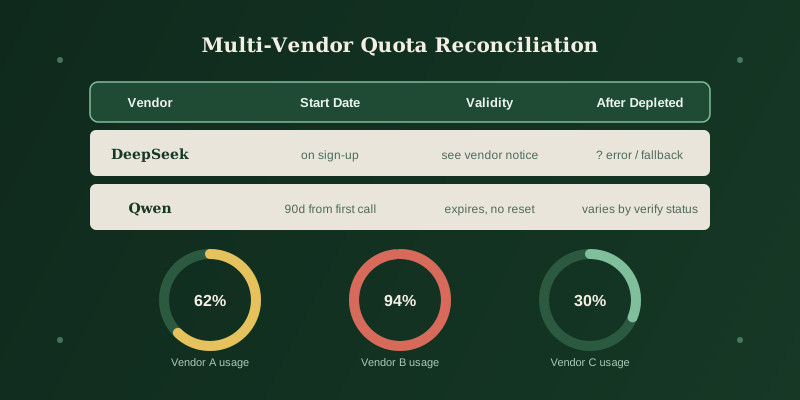
Free quota sounds like a simple concept, but it actually breaks down into at least three specific questions that different vendors can answer differently — and all three matter. First, the start date: does the quota begin counting the instant the account is registered, or only once the first real API call goes through? That determines whether a team that registered but didn't start development for a few weeks already burned through part of its window before writing a single line of integration code. Second, validity: does the quota carry an expiration at all, and if it expires unused, is it simply forfeited with no way to extend or reissue it, or does it stay usable indefinitely until consumed? As one concrete, officially documented example, Alibaba Cloud Model Studio's help center states that its new-user free quota is valid for 90 days "from whichever is later: activation of Model Studio, model release, or model application approval," and once it expires it lapses automatically with no reissue, extension, or reset — a case where the vendor spells out both the start date and validity rule explicitly. Third, post-depletion behavior: once the quota is used up, does the API quietly downgrade to metered billing and keep charging, or does it return an error and refuse to respond? Alibaba Cloud Model Studio's own documentation shows this can further split by verification status: verified accounts automatically move to pay-as-you-go once the quota runs out, while unverified accounts simply cannot make further calls until they complete verification and top up; and if a user has additionally enabled a "stop when depleted" toggle, the API instead returns an HTTP 403 error (error code AllocationQuota.FreeTierOnly) once the quota is gone. Each of these three facts can differ by vendor, and, as this example shows, can even split further within a single vendor based on account verification status or an optional setting — none of it can be assumed to be "probably the same everywhere."
3. Why inconsistent rules turn "quota ran out" into "outage" or "overbilling" in people's heads
Here's where it goes wrong: when a team relies on one generic dashboard tracking overall API error rates, or a single lump-sum monthly bill, without breaking those three facts out per vendor, a depleted free quota shows up in one of two easily misread ways. If a vendor's default behavior on depletion is a hard error, engineers suddenly see a spike in failed calls and reasonably suspect a vendor outage, a network issue, or even a bug from a recent deploy — the possibility that "the free quota simply ran out" rarely comes to mind, because nobody on the team remembers how much quota that account had left or when it was due to expire. Conversely, if a vendor's default behavior is to silently fall back to metered billing, whoever reconciles the monthly invoice suddenly spots a line item that never appeared before, since that vendor's usage had always been fully covered by the free quota and the bill had stayed at zero or near-zero. That jump from nothing to something reads, instinctively, as "we got overbilled" or even "the account was compromised," rather than the far more mundane explanation: the free quota expired and the system did exactly what it was designed to do by switching to pay-as-you-go. The two misreadings point in different directions, but the root cause is identical — nobody kept a per-vendor record of these three rules, so a perfectly ordinary quota-depletion event gets systematically mistaken for an anomaly, and the team burns time checking networks, auditing code, or even filing a support ticket disputing a "mystery charge" instead of just opening the usage dashboard that would have answered the question in seconds.
4. The fix: keep a per-vendor record, and set independent usage alerts by vendor
Fixing this doesn't require any architectural overhaul — the key shift is treating "multi-vendor free quota rules aren't standardized" as a known, manageable operational fact rather than something to be discovered mid-incident. Two concrete steps handle it. First, keep a simple per-vendor record for every large-model provider you connect to, logging the three facts above — start date, validity period, and the specific post-depletion behavior (auto-billed vs. hard error, and whether that depends on verification status). Ten minutes spent confirming this at signing or first integration saves far more time than digging through a vendor's docs mid-incident later. Second, in whatever usage or cost monitoring you already run, don't rely on one blanket "total calls" or "total spend" alert — set a separate usage-warning threshold per vendor, so a notification fires once a given vendor's free quota hits, say, 80% consumed, rather than waiting until it's fully gone and calls start failing or the bill changes. That gives the team a few days' runway to proactively switch to a backup vendor, accept metered billing on that path, or simply throttle calls down — instead of getting blindsided one morning by a batch of errors or an unfamiliar charge.
5. Bottom line: multi-vendor cuts single-point risk, but adds a reconciliation chore that's easy to skip
Connecting to multiple domestic large-model APIs at once for redundancy or head-to-head comparison is a sound and common engineering decision, but it comes with an easily overlooked operational cost: each vendor's free-quota start date, validity, and post-depletion behavior can all differ, and these rules are usually scattered across each vendor's own documentation or help center with no industry-wide standard to fall back on. The practical fix is to treat those three specific facts as part of the integration checklist — on par with API keys and billing setup — verified and logged per vendor, and to set independent usage-warning thresholds in monitoring for each one. That beats scrambling to guess whether a sudden error or an unfamiliar bill line means an outage, fraud, or simply an expired free quota. Always defer to the official documentation of whichever vendor you're actually integrating with at the time; this article does not represent any vendor's current, complete billing policy.