
Verification Checklist
- ✓Open ChatGPT web billing and API platform billing separately and confirm which ledger failed, instead of reading only the chat error.
- ✓In Claude Settings > Usage, check whether you hit a five-hour usage window, a weekly cap, or a declined payment method.
- ✓Record the last successful charge date, next renewal date and payment last four digits, then match them against the issuer or virtual-card console.
- ✓If you fund with stablecoins, confirm destination chain, token and amount at least two days before renewal; test a small swap first.
- ✓Before depending on a workspace for daily delivery, run a real official export and note what history, project files and custom instructions actually travel.
1. When the box freezes, separate quota from payment
When the input box stops sending, the first guess is usually “the model is down” or “the product got worse.” Both can be true. A more common, and more often missed, third case is that the service is up and your access is paused. OpenAI’s Plus/Pro renewal failure article points to browser cache, bank blocks, billing-detail mismatches and unsupported regions—not model weights. The same “it doesn’t work” screen should first be split into a failed charge versus a usage cap, then you decide whether to update the card, wait for a reset, or check a status page.
Anthropic draws a sharper line: usage limits cap how much you can consume over time, while length limits cap how much one conversation can hold. Web, desktop and Claude Code share one pool. Hitting a usage cap means waiting for the window, upgrading, or turning on usage credits—not immediately switching vendors. Treating a spent quota as downtime puts failover on the wrong layer.
2. “I already paid” often means the wrong ledger
A quieter error is mixing invoices. OpenAI states that ChatGPT and the API platform have separate billing systems, each with its own settings. A successful Plus charge does not fund an API organization. Cancelling a web subscription does not stop an App Store renewal. Workspace payment methods are usually owner-only. Finance can say “we already paid for AI this month” while engineering still sees API 429s or an unpaid organization invoice.
Keep four fields on every service: product name, charge channel (web, app store or API), paying entity, and next renewal date. If those four disagree, do not add seats or buy a more expensive model yet. In-app purchase refunds also sit with the store, not vendor support. That delay is a payment-path issue, not a capability issue.
3. Lock-in is usually data, not the leaderboard
Models can be replaced. Conversations, project files, custom instructions and process memory rarely move as a whole. Official export can produce a history copy, but it is not a full migration: sidebars, memories, subscriptions and workspace membership do not restore themselves from a JSON file. Before a workspace becomes daily infrastructure, run an export-and-restore drill and write down what actually travels. If continuity depends on “the chat history still being there,” you bought switching cost, not capability.
The data layer also has an ownership edge. Team seats are billed by the owner; if that account is closed, other seats often lose access immediately or soon after. Personal export eligibility is not the same as an enterprise workspace export. Keep key prompts, acceptance checks and recurring task specs in a document store you control, rather than assuming “the model will remember” through a billing incident.
4. Overseas payment adds cards, chains and settlement time
For AI services that need international payment, the continuity layer also runs through virtual-card balances, billing addresses, 3-D Secure, and the chain your stablecoins sit on. An empty card or the wrong chain on renewal day often misses the issuer’s settlement window. OpenAI notes that banks may block cross-border or online charges by default, and a failed 3-D Secure attempt looks like a decline. In the chat window that reads as an outage; the root cause is that funds were not in the right instrument on time.
If stablecoins sit on the wrong chain, convert them before the renewal date instead of bridging at the last hour. A non-custodial cross-chain aggregator can do that step—AllSwap works without registration: pick source and destination assets, compare quotes, and complete the swap. This is a promotional link. A swap only funds the payment rail; it cannot cancel a subscription or improve model quality. Checking refund-on-failure behavior, destination addresses and a small test swap are checks you run yourself, not outcomes the vendor guarantees.
5. Monthly review only works when the three ledgers stay separate
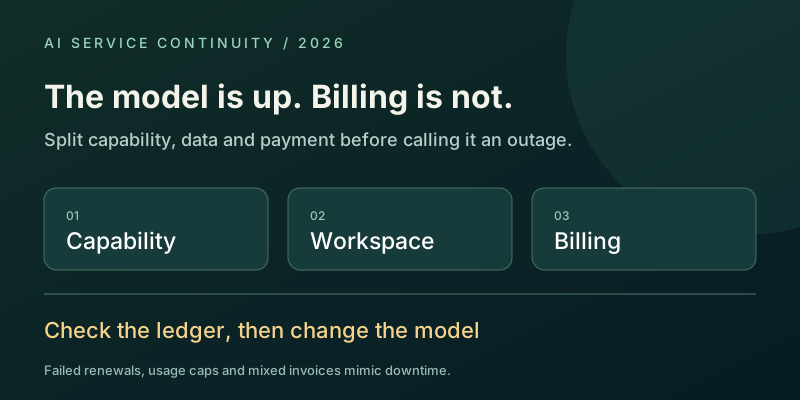
Once the stack is split, a monthly review gets shorter. Capability is accepted output, not request count. Data is whether you can export and who holds keys and workspaces. Payment is whether funds sit on the correct rail before the next charge. If the model still answers while a charge is retrying, log a payment incident, not “the AI service is unstable.” If a usage cap appears, compare it with the rolling window and weekly limit, not a card decline.
Correct diagnosis keeps the action from being wasted: swapping models does not fix a wrong chain, and extra seats do not clear an unpaid invoice. Long-term value in an AI service requires all three layers to stay continuous. Comparing only which model is stronger, while leaving billing and workspaces unmanaged, hands production availability to one lucky charge.