
Verification Checklist
- ✓Open the official billing/usage page for each AI tool you're subscribed to and check whether this month's actual consumption (word count, credits, or seats) is close to or over your current tier — don't guess from memory
- ✓For credit-based tools like Midjourney or Runway, log in and check the remaining Fast hours or credits to confirm they'll last until the next billing cycle
- ✓Check the monthly limit set on your virtual card for each AI tool and confirm it covers the actual subscription cost, including any likely overage charges — a limit set too low will cause a renewal to fail
- ✓Before switching any tool from monthly to annual billing, verify your virtual card's expiry date covers the full annual subscription period
- ✓Compare what you'd actually pay under the subscription plan versus pay-as-you-go for the same tool, based on your real usage over the last 1-2 months, before assuming your current plan is the cheaper option
1. Why Thinking in Scenarios Matters
Most people don't think about AI tools by category — they think by task. "I need to write a blog post." "I need to generate product images." "I need to debug this function." The problem is that the billing logic varies dramatically between use cases, and if you don't understand it before subscribing, you'll either over-pay or constantly hit hard limits at the worst moment.
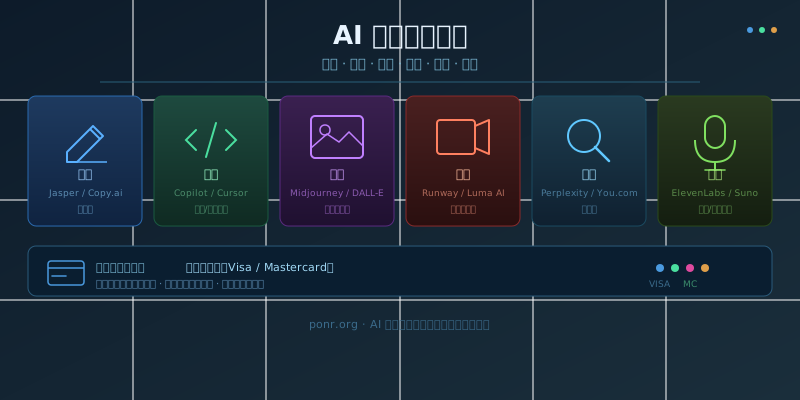
The six AI use case categories covered here — writing, coding, image, video, search, and voice — account for the vast majority of what individual creators, developers, and knowledge workers actually need. Each has its own pricing logic, its own set of traps, and its own payment channel quirks. Understanding all six together also reveals a cleaner payment strategy: consolidate every AI bill onto a single virtual card rather than scattering them across multiple payment methods.
2. AI Writing Tools: Subscription-Based, Billed by Word Count or Credits
Writing is the most mature AI use case. Jasper, Copy.ai, and Notion AI are the main players. Jasper charges by word generation volume — the Starter plan runs about $39/month with a word count ceiling, and upgrades are needed for heavier output. Copy.ai has shifted to a seat-based subscription model at around $36/month per user. Notion AI is an add-on on top of a Notion subscription at roughly $10/user/month, making it the natural choice for teams already using Notion.
The trap with writing AI tools is that free tiers are generous enough to demo but thin in production. Running one month of actual usage before committing to a plan is almost always worth it — the gap between the Basic and Pro tiers can be significant if your word volume is high. All these tools require Visa or Mastercard for payment; local payment methods like Alipay don't work. A virtual card from a platform like RDVCC handles this cleanly — generate a card, set a monthly limit, and bind it to each tool.
3. AI Coding Tools: Per-Seat or Usage-Based, the Highest-ROI AI Use Case
Coding is the AI use case with the clearest return on investment. GitHub Copilot Individual costs $10/month per seat; Copilot Business runs $19/seat/month. Cursor's Pro plan is $20/month and includes a fixed quota of fast model calls against whichever frontier models are currently selectable in-app. Tabnine targets enterprise teams with custom pricing. All three follow the same pattern: a base subscription with an included quota, and overage charges or degraded service once the quota is exhausted.
The most common surprise for new Cursor users is hitting the fast-call limit mid-month and dropping to slower models without warning. Teams running Copilot Business should audit seat counts quarterly — unused seats don't auto-cancel and the charges accumulate. GitHub Copilot accepts any valid Visa or Mastercard; a US-issued virtual card avoids the occasional region-specific billing failures that show up with some non-US bank cards.
4. AI Image Generation: Credit-Based, Usage Scales Quickly
Midjourney is the benchmark product in this AI use case. The four tiers — Basic ($10/month), Standard ($30), Pro ($60), Mega ($120) — differ primarily in Fast GPU hours: Basic gives 3.3 hours/month, Standard 15, Pro 30. When Fast hours run out, the queue moves to Relax mode (much slower), or you pay $4/hour to top up. DALL-E 3 is bundled with ChatGPT Plus at $20/month, which is often the most cost-efficient entry point if you're already subscribed.
Adobe Firefly, Stable Diffusion via DreamStudio, and Leonardo AI all use point or credit systems with slightly different cost-per-image math. The general pattern: image AI billing is unpredictable for high-volume users because generation speed and quality vary per prompt, making monthly costs hard to forecast. Set a monthly limit on your virtual card for image tools specifically, since these are the subscriptions most likely to run over.
5. AI Video Generation: Credit-Per-Second Billing, the Most Expensive AI Use Case
Runway and Luma AI's Dream Machine are the leading tools in this AI use case. Runway's Gen-3 Alpha charges roughly 10 credits per second of generated video; the Standard plan ($15/month) includes 625 credits, the Pro plan ($35/month) 2,250 credits. Luma's Dream Machine Standard tier costs about $30/month with a fixed generation quota. Kling AI and Sora (via ChatGPT) are also now viable options at comparable price points.
Video generation is by far the most expensive AI use case per unit of output. A single high-quality 10-second clip can consume a significant share of a monthly plan. For occasional users, pay-as-you-go credit top-ups make more sense than monthly plans. For teams with regular output targets, calculate a monthly generation volume estimate before choosing a tier — the jump from Standard to Pro is usually justified at around 3–4 minutes of video per month.
6. AI Search: Subscription-Only, Replacing Traditional Search Engines
Perplexity is the fastest-growing tool in this AI use case. The free tier includes limited Pro searches; Perplexity Pro ($20/month) unlocks unlimited Pro searches and access to stronger underlying models (GPT-5, Claude Sonnet 4.6, Gemini 3.1 Pro, and others selectable in-app — the exact roster shifts as providers ship new models). You.com follows a similar structure but skews more toward B2B use cases, with a more complete free tier for individual users.
Compared to other AI categories, search tool pricing is simple: flat subscription with no credit complexity. For researchers, journalists, and content creators who live in search, the $20/month Pro plan typically pays for itself quickly. Pricing and feature comparisons for AI search tools change often — resources like AI tool navigation directories track these updates if you want to compare options before committing.
7. AI Voice & Music: Character-Counting and Generation-Quota Billing
ElevenLabs is the standard for AI voice cloning and text-to-speech. It bills by character count: the free tier gives 10,000 characters/month; Starter ($6/month) 50,000; Creator ($11/month, often discounted the first month) 100,000; Pro ($99/month) 500,000 — check the official pricing page for current figures. Suno handles AI music generation on a quota basis: Basic ($8/month) allows around 500 song generations per month, Pro ($24/month) 2,500, Premier ($48/month) 10,000 — with commercial licensing unlocked at Pro and above.
Voice and music billing is the most granular of all AI use cases. ElevenLabs character consumption can be deceptively fast when generating long narration content — a 30-minute podcast script can exhaust a Creator tier quota in a single session. Track actual usage in the first month before locking into any tier. Suno's monthly quota resets sharply and unused credits don't carry over, so over-subscribing is a real cost risk.
8. One Virtual Card for All Six AI Use Cases
Running subscriptions across all six AI use case categories means managing 4–8 separate billing relationships, each with its own renewal date, currency, and failure mode. The cleanest approach is to route all AI tool payments through virtual cards — ideally one card per use case cluster, so a billing problem in one category doesn't cascade into the others going dark.
Virtual cards from services like RDVCC are funded with USDT/USDC and issue Visa cards that work with all the tools listed in this guide. The key feature to look for is per-card monthly limit control — set each card's limit to match the expected spend for that category, so a runaway credit charge on a video tool can't drain the budget reserved for your writing and coding subscriptions.
A practical card allocation for someone using tools across all six AI use cases: one card for writing and search tools (predictable flat subscriptions), one card for coding tools (seat-based and relatively stable), and one card for image and video generation (credit-based and volatile). Voice and music tools can join whichever cluster fits the usage pattern.
9. Subscription vs. Pay-As-You-Go: Which Saves More
Most AI tools offer both a subscription tier and some form of on-demand credit purchasing, but the math differs by AI use case. For writing and search tools — where usage is predictable and high-frequency — a monthly or annual subscription wins. For image, video, and voice tools — where output volume fluctuates — starting on the lowest paid tier and topping up credits is almost always cheaper than upgrading prematurely.
Annual billing discounts of 15–25% are common across all categories, but they require confident volume forecasting. The safest approach: run two months of monthly billing first, measure actual consumption, then switch to annual if the numbers support it. When switching to annual billing on a virtual card, verify the card's expiry date covers the full subscription year — a card expiring before the annual renewal fails silently and cancels the subscription.
10. Summary
The six major AI use cases — writing, coding, image generation, video, search, and voice — each have distinct pricing logic. Writing and search are flat subscriptions; coding adds per-seat complexity; image and video are credit-based and volatile; voice bills by character or generation count. Knowing which category you're in before subscribing saves real money and avoids the most common billing surprises.
For payment, a virtual card platform that supports per-card limit controls is the right infrastructure for managing AI tool subscriptions across multiple use cases. If you want deeper dives on specific tools, this site has dedicated breakdowns for AI tool subscription comparison, virtual card payment setup for AI tools, and AI subscription payment methods — covering the payment side of each use case in detail.