
What to check
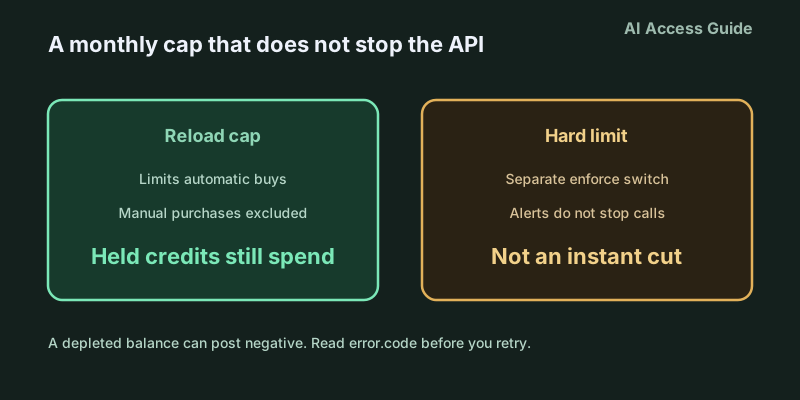
- ✓On the billing page, separate the auto-reload monthly limit, the spend alert, and whether Enforce a hard limit is on.
- ✓On a 429, read
error.code. Do not retry a billing or quota failure just because the status is 429. - ✓A negative balance is usage during the processing delay, deducted from the next purchase. A dashboard zero is not proof that traffic already stopped.
- ✓The approved monthly usage limit is a separate line. The tier follows total credit purchases, not this month’s spend.
- ✓Auto-reload is on by default at setup. Manual purchases do not count toward the monthly reload limit, and credits you already hold can still be spent.
1. The number you typed limits automatic buys
New API accounts are prepaid: buy credits, then call. Free credits are consumed before purchased credits. Auto-reload is on by default during setup. You set a threshold, a balance to restore to, and an optional monthly reload limit. The minimum purchase is $5; the default initial buy in that flow is $10. The balance figure can lag the ledger by a few minutes. Trust tier, from usage and payment history, caps the maximum balance and the maximum recharge. Those ceilings are on your account page. Someone else’s screenshot is not your limit.
Three rules on the monthly reload cap are easy to invert. Manual purchases do not count toward it. If an automatic recharge would exceed the remaining allowance, only the remainder is added, and only if that remainder still meets the $5 minimum. Once the month’s auto-reload allowance is used up, no further automatic purchases happen until next month. All three rules answer “can the system buy more credits?” None of them answers “can existing credits still be spent?” A recharge limit is not an API usage limit. Credits on the account still authorize requests. Reading “I set $50” as “the API stops at $50 this month” will not match the invoice.
Accounts on monthly billing can also buy credits, and those credits offset the invoice. That purchase is still not a hard spend limit. A screenshot labeled “monthly cap” does not tell engineering whether finance captured the reload cap, an alert, or the enforce switch.
2. Alerts, hard limits, and the approved tier are three other doors
A spend alert is a notification. Traffic continues. The field lives under Organization limits, or Project settings → Limits → Spend → Edit spend limit. Typing a Monthly spend limit does nothing to API responses until Enforce a hard limit is on. With the switch on, an organization-wide block is HTTP 429 with error.code organization_spend_limit_exceeded. A project block is project_spend_limit_exceeded and applies only to traffic billed to that project. The organization hard limit covers every project. Enforcement is not instantaneous; recorded spend can run slightly past the number. Alerts stay active beside a hard limit.
Raising or removing a limit that has already been hit resumes traffic after the change propagates. Otherwise the counter resets on the next monthly cycle. OpenAI’s approved monthly usage limit is a fourth ceiling. Hitting it returns organization_usage_limit_exceeded. It is not the spend field you typed. Tiers move on total credit purchases, not on spend this month. Checked on 13 Oct 2026: Free, in an allowed geography, is $100 a month of usage; $5 of total purchases reaches Build at $500 a month; $100 reaches Launch at $5,000; $500 reaches Grow at $200,000. Thresholds change. Reconcile against the approved amount on your Limits page, not against a memorized RPM for one model.
A positive balance does not mean the request is under every limit. Rate limits, the approved monthly usage limit, and a user-configured hard limit are enforced separately. A 429 with credits still showing means you read the code before you buy more.
3. A zero balance does not stop the meter at that instant
When prepaid credits run out, the error is credit_balance_exhausted. Do not treat a dashboard zero as proof the API has stopped. The docs say the API may not stop immediately. Usage during that delay can post as a negative credit balance and is deducted from the next purchase. “Safe once it hits zero” is the failure mode: the minutes you thought were idle become a reduction on the next buy.
If the initial payment fails, you get an error and no credits. If auto-recharge fails, you get email; usage stops when the available balance is exhausted, still subject to the same delay. A disputed or refunded payment removes the equivalent credits. Purchased credits expire after one year. OpenAI cannot extend purchased credits or credit grants. They are non-refundable except where law or contract requires it, or where an approved exception applies: a verified billing error, confirmed unauthorized activity, or a confirmed service failure or incorrect account restriction. Used credits are refundable only for confirmed unauthorized use or a verified billing correction. A remaining balance is not a refund right, any more than a reload cap is a fuse.
4. A 429 is not one failure, and a retry can enlarge the bill
A temporary rate-limit 429 and an overload 503 can carry Retry-After. The official SDK retries the eligible cases. slow_down is a 429 rate-limit error from ramping; server_is_overloaded is a 503. The same docs say not to retry quota errors, billing errors, or anything else that needs a person to change a setting. A hard spend limit is also a 429, but the code is one of the two spend-limit codes above. Retrying because the status is 429 keeps sending into a window that is already closed, and usage in the delay can land as a negative balance.
Recover from the code, not from the status. Spend-limit codes: raise or remove the limit on the scope that fired, then wait for propagation. organization_usage_limit_exceeded: request a higher approved usage limit. Another purchase does not instantly change the tier; the tier follows cumulative purchases, and the approved amount is a separate line. credit_balance_exhausted: add credits, and expect the next purchase to fill the negative first. Only rate-limit codes belong in the rate-limit guide. A log that stored only the HTTP status cannot tell these four paths apart later.
5. Funding the card is a fifth ledger
Reconcile four columns. First: whether auto-reload is still on by default, how much of the monthly reload cap remains, and whether a manual buy was counted against it by mistake. Second: whether Enforce a hard limit is on, and whether that limit is organization-wide or project-scoped. An alert is not that switch. Third: the approved monthly usage on the Limits page, and the fact that the tier follows total purchases rather than this month’s consumption. Fourth: error.code on the failed response, next to a balance that is positive, zero, or negative.
Funding the card is a fifth ledger. Moving stablecoins on-chain into assets that can top up a card happens before you buy OpenAI credits. It does not change any of the four columns, it does not extend credit expiry, and it is not an API balance. When that funding step is what you need, AllSwap is a no-signup, non-custodial swap. A completed swap means the assets moved. It does not mean prepaid billing, a hard limit, or the usage tier has cleared the request.